Showing posts with label game development. Show all posts

Friday, November 18, 2011

This Week @Sivart Tech: November 18, 2011

So this week we have been busy working on our December release of Word Crank.  This release will include some exciting new features.

First, we are implementing the Game Feed feature that is new to OpenFeint, which will allow users to find out more about what the other users of the game are doing.  This will include changing their profile pictures to conquering one of the many levels.  We hope that this will be a fun way to become more engaged with our game.

Next, we have several graphics changes that we hope will give the game more appeal and make it more polished.  And with any new build that we work on, performance improvements and bug fixes are the standard.

Also we are excited that our Android downloads are continuing at a steady rate, adding more than 1,000 new downloads over the past week!

Sunday, October 16, 2011

A Word Game That Does Not Try to Save the World

So what makes our products unique?  One of the rules of marketing is to know your product and be prepared with an elevator speech.  You know, a 30 second pitch prepared, the time of a typical elevator ride about your product and what sets it apart from all others.

So here goes:

Introspectively speaking, due to experiences in life unique solely to us, our acuity is shaped causing anything we create to be different from anyone else.  And blah…blah…blah…

So now that we’ve cleared the air and have identified on a cosmic scale what makes our product unique, looking on a more rudimentary scale, what motivated the creation of Word Crank?  Put simply, a desire to find a word game that we would actually play.

We’re not intimating that there weren’t any good word games out there, because there are.  We were simply looking for a game that combined elements of Word and Arcade style gaming that we both would be interested in.

You see although being siblings, we have two different backgrounds and stakes in our product.  Here comes the very exciting history lesson: 

Our CTO is a computer programmer by profession, and has single-handedly coded all of our projects. Her objective when creating a game centers on playability and usability.  The code has to work and memory allocation is central around enhancing the user’s experience.

The CEO’s experience with coding begins and ends with formulas for excel worksheets.  With a background in business and an avid “gamer”, for him it just has to pop and be fun.  “No chipped paint” as Walt Disney articulated around his reason for creating Disneyland.  It just has to look good!

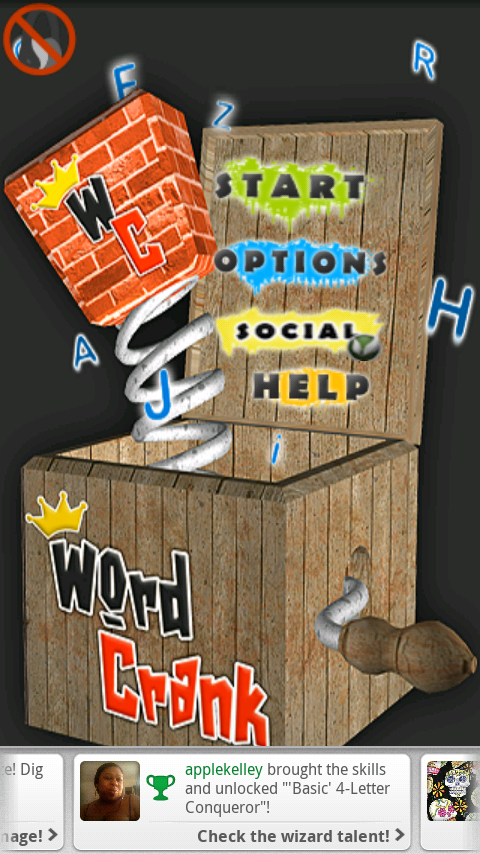
Combine these and you get Word Crank our very first release.  A word game that’s not buggy, has a very expansive dictionary and does what it’s supposed to do (in our developer voice).  But then it does something else.  It creates an atmosphere with a beautiful UI (User Interface).  A word game with elements of grunge, hip hop, pop, and action!  (Guess whose voice added this)

You see, both voices played a major role in the creation of Word Crank.  We combined programming principles which allow our game to play smoothly and feel effortless.  We also brought arcade to our game by not just allowing you to make the word C-A-T and get 50 points, YAY *sarcastically* but we brought engaging music, cool animations, and some serious themes.

We thank all of our 5k+ downloads on the Android market and are excited that overall reception has been positive with only 6 users rating below 4 stars (send us a message on what you’d like to see to change that to a 4/5) We’re going to keep making cool apps that people like and promise to never take ourselves too seriously but remember it’s just a Word game that doesn’t try to save the world.
Thursday, September 22, 2011

Facebook F8 Conference: What it can mean for your Mobile App

The Facebook F8 Conference  promises to unveil exciting new features to allow users to engage with content.  One thing that is already noticeable is the new look of users' Facebook NewsFeed.  Even though this new feature has its fair share of critics, I feel that Facebook is positioning itself to take an even larger role in people's lives.  So how does this effect developers of Mobile Apps?

Well one major thing that I can foresee is that Mobile Game Developers may want to strongly consider moving their games to the Facebook App Platform.  Even without taking full advantage of all of the social features that the Graph API has available, several games could be quite successful.  Some simple Googling can provide several short tutorials to get one started in creating their very own Facebook App.  That's just my two cents for today.

Sunday, September 11, 2011

SOLUTION: Apple Mach-O Linker Error When Compiling iPhone App

Recently encountered the following error when compiling an iPhone Application, "Apple Mach-O Linker Error".  After some digging I realized that I had included the same file twice in the application.  After removing the duplicate file the error went away.  Hope this helps someone else that has a similar error.

Read more about iPhone Development

Download Word Crank on Android for FREE!

Thursday, September 1, 2011

Working with Texture Packer

In my post about some simple iOS and Android programming tips I mentioned a software called Texture Packer that is very useful in creating Sprite Sheets.  Below are the steps that can be used to create a simple Sprite Sheet which are the steps that I used in creating Word Crank.

Instructions


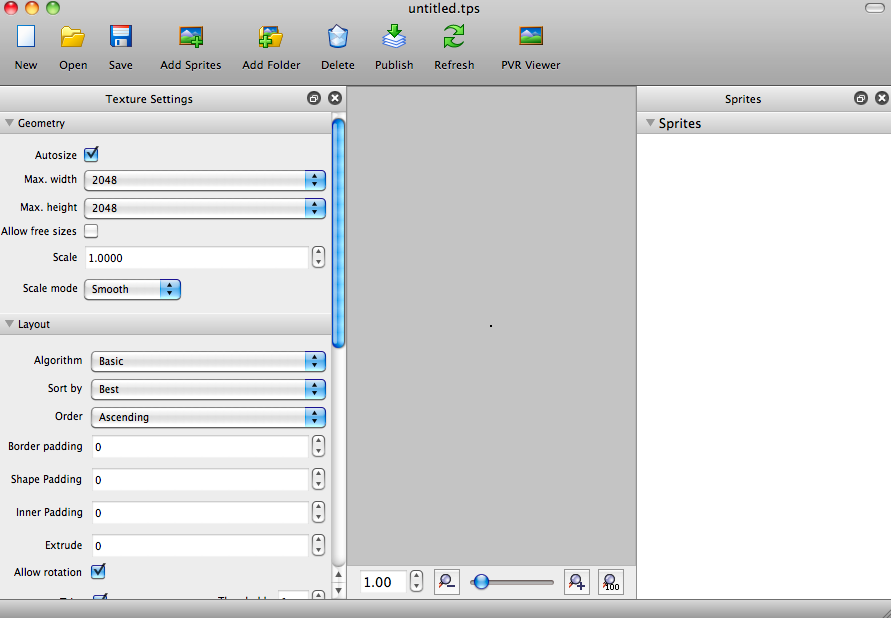
  1. Open Texture Packer.  You will be presented with a blank view where you can add your Sprites.

  2. Click on the 'Add Sprites' button to select the Sprites that you want to include in your Sprite Sheet.

  3. Once you have selected your Sprites, just click the 'Publish' button and you can will have two files, the .png file which is your Sprite Sheet and a .plist file which can be used to identify where each object is located in the Sprite Sheet.


Screen Shots


Wednesday, August 31, 2011

Our first YouTube review!

We just had Word Crank reviewed on YouTube!
This is an excellent review which discusses how addictive the game truly is.

Check it out:  http://www.youtube.com/watch?v=ZyBu7B9qFo8

Monday, August 29, 2011

Tips: Programming for Android and iOS

As I continue my foray into game development on the iOS and Android platforms I wanted to take a few moments to share some tips that I have found to be very useful in creating an application that can will eventually run on both platforms.

Tips


General


  1. Separate the game logic from the user interface layer.  This will make it easier to port the code over to the accompanying platform.  For example, if you put the main game loop logic in a separate Java class, then you basically can just do a line by line conversion to Objective-C when you port it to iOS.

  2. Place all Strings in one location.  Have a Constants.java where you put all of your static String objects, then when you port to iOS you just use the same thing, except now it is Constants.h.

  3. If you are going to use Texture Atlases in your game, create them using a tool such as Texture Packer and then you will have the exact location of each Sprite stored in a file that can be easily referenced for both versions of the game.


iOS


Use a framework! Working with Cocos2d made the transition relatively smooth as we converted Word Crank from its Android version to iOS.

Android


Get a good book, I read Beginning Android Games, it helped lay a good foundation for working with Android and understanding the various states of a running application and the GLSurfaceView that serves as the main background for all OpenGL drawings.

Any questions? Just leave a comment. Thanks.

Thursday, August 25, 2011

Application Crash Reporting -- Android Style

In order to provide users with an error-free as possible application, it's imperative that you use some form of Crash Reporting. The ACRA library which is available on Android provides such a framework. Here is how they describe their tool:
"ACRA is a library enabling Android Application to automatically post their crash reports to a GoogleDoc  form. It is targeted to android applications developers to help them get data from their applications when they crash or behave erroneously."

We have integrated the ACRA library into our application, Word Crank, so far I have been able to fix 3 major bugs that did not turn up in testing, but were clearly called out in the Google Doc created by the ACRA tool. We chose to go with the most basic functionality that of sending a Crash Report every time the application Force Closes. However, it is very configurable and can display status messages, custom Android Toasts, etc.

I highly recommend this tool for anyone developing an Android Application. You can download it here: ACRA Crash Reporting Tool

Tuesday, August 23, 2011

Adding Touch Events to a Custom Cocos2d Sprite

In creating our game Word Crank, we decided that we would make the clickable block objects handle the touch events themselves instead of using the CCScene object. In order to do that we had to implement the CCTargetedTouchDelegate.  A sample of the code can be found below:

Inside the Header File:


[sourcecode language="objc"]
@interface CustomSprite : CCSprite <CCTargetedTouchDelegate>
[/sourcecode]

Inside the Implementation File:


[sourcecode language="objc"]

- (void) onEnterTransitionDidFinish
{
[[CCTouchDispatcher sharedDispatcher] addTargetedDelegate:self priority:1 swallowsTouches:YES];
}

- (void) onExit
{
[[CCTouchDispatcher sharedDispatcher] removeDelegate:self];
}
[/sourcecode]

Sunday, August 21, 2011

iOS App Submission == "Headache"

So for the past two days I have been attempting to upload our Word Crank Application for iOS to the iTunes Store.  I have been completely unsuccessful.  I constantly receive this error message, "Error communicating with iTunes Store." Now, why is there an error? I have no idea and apparently neither does anyone else.


I have read several, and I mean several blog posts and everyone says something different.  My favorite post is "I just used another machine, and it worked."  Thanks a lot!  I just need to buy another computer and then magically it will work, GREAT!

I have sent an email to Apple to try and get some answers on this issue.  Until then I guess I have to wait, unless anyone out there has any other ideas:-(

Thursday, June 30, 2011

Converting an Integer to an Int Array

During game development one thing that you want to avoid as much as possible is allocating memory in your main game loop.  One item that typically changes often during game play is the user's score.  In order to avoid creating new objects to store the user's updated score value, you can store each digit of the new score in an array.  Then use a simple method to display the portion of your texture, or image graphic, that maps to each digit.  The method that I used to convert from an Integer to an int array is shown below.

public static void setScore(int[] score, int points) {
int temp = points;
int i = 0;
while (temp > 0) {
score[i] = temp % 10;
temp /= 10;
i++;
}
}