Showing posts with label CCSprite. Show all posts

Thursday, September 1, 2011

Working with Texture Packer

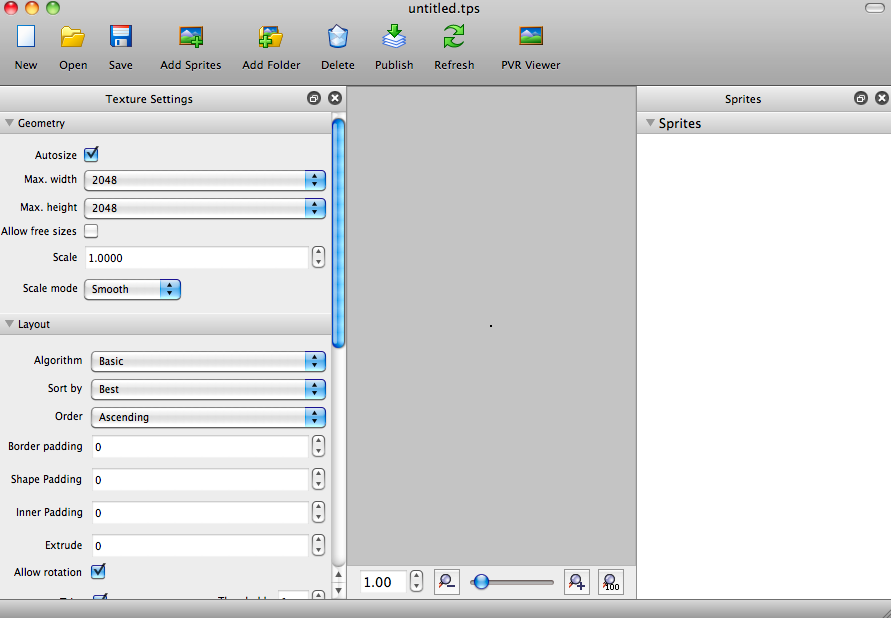
In my post about some simple iOS and Android programming tips I mentioned a software called Texture Packer that is very useful in creating Sprite Sheets.  Below are the steps that can be used to create a simple Sprite Sheet which are the steps that I used in creating Word Crank.

Instructions


  1. Open Texture Packer.  You will be presented with a blank view where you can add your Sprites.

  2. Click on the 'Add Sprites' button to select the Sprites that you want to include in your Sprite Sheet.

  3. Once you have selected your Sprites, just click the 'Publish' button and you can will have two files, the .png file which is your Sprite Sheet and a .plist file which can be used to identify where each object is located in the Sprite Sheet.


Screen Shots


Tuesday, August 23, 2011

Adding Touch Events to a Custom Cocos2d Sprite

In creating our game Word Crank, we decided that we would make the clickable block objects handle the touch events themselves instead of using the CCScene object. In order to do that we had to implement the CCTargetedTouchDelegate.  A sample of the code can be found below:

Inside the Header File:


[sourcecode language="objc"]
@interface CustomSprite : CCSprite <CCTargetedTouchDelegate>
[/sourcecode]

Inside the Implementation File:


[sourcecode language="objc"]

- (void) onEnterTransitionDidFinish
{
[[CCTouchDispatcher sharedDispatcher] addTargetedDelegate:self priority:1 swallowsTouches:YES];
}

- (void) onExit
{
[[CCTouchDispatcher sharedDispatcher] removeDelegate:self];
}
[/sourcecode]