Showing posts with label Game Development. Show all posts

Wednesday, June 19, 2013

[Android Tips]: Play Store 'staged rollouts' with Google Analytics

Recently the Google Play Store has added the ability for developers to release a new version of their application's apk progressively by means of staged rollouts.  According to Google this allows you to "get feedback on your new app or app update early in its development and make sure your users are happy with the results."  With the release of the latest version of Word Crank, our flagship game, we decided to take advantage of this new feature.

Staged Rollouts


We released version 1.5.0 of our application to 20% of users initially and then monitored the results in Google Analytics.  In order to distinguish the engagement of the users on the latest version of the app from the others, we created two new custom segments in our primary Dashboard view.  The first segment included all users with version 1.5.0 of the application and the other segment included all other versions of the application.

Custom Segments


Once these segments were created we monitored the statistics for a few days and then gradually increased the percentage of rollout to 100%.  This is an extremely useful tool in making sure your new release increases user engagement and the desired traffic goals of your application.

Have you tried staged rollouts?  Leave a comment below.

Monday, October 8, 2012

Game Development: Using Google Analytics to track user flow

Recently we have begun to take advantage of the flow visualizations available from Google Analytics for analyzing user behavior in Word Crank.


What is a Flow Report?
"Flow Reports in Google Analytics illustrate the paths visitors take through your website...In one graphic, you can see how visitors enter, engage, and exit your site. " -- Google Analytics

One aspect of these diagrams that I especially appreciate is the ability to compare two different time frames and see how the user flow differs.  I really recommend this if you include a new feature in your application and want to see what impact it has on user behavior.

How to Compare Two Dates:

  1. Select Compare to Past

  2. Choose a second date range

  3. Choose similar time periods ( full months or weeks )


Happy flow reporting!

Wednesday, August 8, 2012

Using Twitter Search Results for #babies

Our newest project Budding Baby, includes a tab with Twitter comments from the public that contains this hashtag, #babies. Not surprisingly, when you perform a generic Twitter search about babies almost anything could come back and does.  For instance, I just performed a search using the following:

[code]http://search.twitter.com/search.json?q=%23babies[/code]

Here is one of the many results:
"U will *neva knw until *dere* is a tragedy..eii so old people also cry *lyk* #babies"

Now that's not quite what we were going for, and that tweet really isn't very positive either.  So what can we do?

Twitter to the rescue...the Search API allows you to append an extra parameter to your query to filter out negative tweets. Wonderful!  So if I run the query again, this time using the "smiley face" parameter, I get much happier tweets.

Here is the new search query:

[code]http://search.twitter.com/search.json?q=%23babies%20:)[/code]

Much happier results:
"baby love. :) #babies #cute #love #life #motherhood http://t.co/mnhrqmlL"

Have you worked with the Twitter Search API?  Leave comments below.

Wednesday, June 27, 2012

Using the Android Monkey tool

Android comes with a command-line tool (Monkey) that allows you to stress-test your application.  Monkey generates some random user events and will stop and report any errors that it encounters. It is very useful in helping to flesh out some not so obvious bugs that could be lurking in your application.  Below is an example of how we used it to test one of our applications under development.


cmd> adb shell monkey -p com.sivart.buddingbaby -v 200


Results:
:Monkey: seed=0 count=200
:AllowPackage: com.sivart.buddingbaby
:IncludeCategory: android.intent.category.LAUNCHER
:IncludeCategory: android.intent.category.MONKEY
// Event percentages:
// 0: 15.0%
// 1: 10.0%
// 2: 15.0%
// 3: 25.0%
// 4: 15.0%
// 5: 2.0%
// 6: 2.0%
// 7: 1.0%
// 8: 15.0%
:Switch: #Intent;action=android.intent.action.MAIN;category=android.intent.category.LAUNCHER;launchFlags=0x10000000;component=com.sivart.buddingbaby/.SplashScreenActivity;end
// Allowing start of Intent { act=android.intent.action.MAIN cat=[android.intent.category.LAUNCHER] cmp=com.sivart.buddingbaby/.SplashScreenActivity } in package com.sivart.buddingbaby
:Sending Pointer ACTION_MOVE x=-4.0 y=2.0
:Sending Pointer ACTION_UP x=0.0 y=0.0
// activityResuming(com.android.launcher)
// Rejecting resume of package com.android.launcher
:Sending Pointer ACTION_DOWN x=47.0 y=496.0
:Sending Pointer ACTION_UP x=29.0 y=503.0
:Sending Pointer ACTION_DOWN x=255.0 y=143.0
:Sending Pointer ACTION_UP x=255.0 y=143.0
:Sending Pointer ACTION_DOWN x=295.0 y=659.0
:Sending Pointer ACTION_UP x=290.0 y=649.0
:Sending Pointer ACTION_MOVE x=-5.0 y=3.0
:Sending Pointer ACTION_MOVE x=0.0 y=-5.0
// Rejecting start of Intent { act=android.intent.action.MAIN cat=[android.intent.category.HOME] cmp=com.android.launcher/com.android.launcher2.Launcher } in package com.android.launcher
:Sending Pointer ACTION_DOWN x=74.0 y=803.0
:Sending Pointer ACTION_UP x=74.0 y=803.0
:Sending Pointer ACTION_MOVE x=3.0 y=-2.0
:Sending Pointer ACTION_UP x=0.0 y=0.0
:Sending Pointer ACTION_MOVE x=-4.0 y=2.0
//[calendar_time:2012-06-22 22:19:07.777 system_uptime:307227]
// Sending event #100
:Sending Pointer ACTION_MOVE x=4.0 y=2.0
:Sending Pointer ACTION_DOWN x=309.0 y=694.0
:Sending Pointer ACTION_UP x=322.0 y=694.0
:Sending Pointer ACTION_MOVE x=0.0 y=-1.0
:Sending Pointer ACTION_DOWN x=294.0 y=319.0
:Sending Pointer ACTION_UP x=294.0 y=319.0
:Sending Pointer ACTION_DOWN x=118.0 y=497.0
:Sending Pointer ACTION_UP x=119.0 y=493.0
:Sending Pointer ACTION_DOWN x=137.0 y=284.0
:Sending Pointer ACTION_UP x=124.0 y=295.0
:Sending Pointer ACTION_DOWN x=258.0 y=403.0
// Rejecting start of Intent { act=android.intent.action.CHOOSER cmp=android/com.android.internal.app.ChooserActivity } in package android
:Sending Pointer ACTION_UP x=273.0 y=403.0
:Sending Pointer ACTION_MOVE x=-5.0 y=-5.0
// Rejecting start of Intent { act=android.intent.action.CHOOSER cmp=android/com.android.internal.app.ChooserActivity } in package android
Events injected: 200
Dropped: keys=0 pointers=0 trackballs=0 flips=0
## Network stats: elapsed time=6268ms (6268ms mobile, 0ms wifi, 0ms not connected)
// Monkey finished


Have you used Monkey successfully?  Leave a comment below to share your results.

Sunday, April 22, 2012

Adding a Application Rating Dialog to your Android Game

UPDATE: Also get users to recommend your app via Google+

In order to increase the number of engaged users who were rating the Android version of Word Crank, we used a small piece of code from Android Snippets that shows a dialog to the user after a number of predefined uses to rate your Application. What were the results?

There were 0.2 App Ratings/day previous to adding the App Rater Dialog, after adding the App Rater dialog we went to 0.33 App Ratings/day.  That is equivalent to a 65% increase in user app ratings by making such a small change.  We felt that this was an important change as user ratings can help increase your placement in the Android Market.  Also, we were hoping to get more positive ratings as the dialog only appears after a user has played the game at least 3 times.

So why not give it a try in your game?  Let us know your results in the comments below.

Tuesday, January 24, 2012

Adding GameFeed to your OpenFeint Enabled Cocos2d App

In order for us to add the new GameFeed feature of OpenFeint to our Word Crank app on iOS we needed to upgrade to the latest version of OpenFeint, version 2.12.5.  After a few issues with linking errors we were finally running with the latest and greatest that OpenFeint has to offer. Complete instructions for upgrading are included here.

Next we wanted to include the GameFeed component, but only on the home screen.  We used a similar approach to how we included AdMob in the free version.  Some code snippets are included below to help others.


[sourcecode language="objc"]
-(id) init
{
if ( (self=[super init]) ) {

CGSize s = [[CCDirector sharedDirector] winSize];

controller = [[RootViewController alloc] init];
controller.view.frame = CGRectMake(0,0,s.width,s.height);

gameFeed = [OFGameFeedView gameFeedView];

[controller.view addSubview:gameFeed];
[[[CCDirector sharedDirector] openGLView]addSubview : controller.view];
}

return self;
}

- (void) dealloc
{
[controller.view removeFromSuperview];
[controller release];

[super dealloc];
}
[/sourcecode]

Do you know a different way to do it? Leave a comment below.

Wednesday, October 5, 2011

A.A.R.F.!! Another Amazing Review Finished!!

Sorry for the dog bark but we @ Sivart Technology are so excited that another review for Word Crank has been done.  Check out the YouTube video done by macrover180:

http://www.youtube.com/watch?v=m6KcGrzcPXI

Such an awesome Camera btw!!  A complete facelift of Word Crank is coming to try to keep up with it's siblings on the way (3 more games in the works!!)

Friday, August 26, 2011

Take a chance on Android

Have you created an Angry Birds, Fruit Ninja, or Cut the Rope game?  If so let me start by saying congratulations and may I borrow $20?   

For any other indie developer looking to break into the ever-growing mobile application market understand that competition is fierce, in particular on the iPhone.  With developers spending in some cases an estimated 100,000k + dollars (Angry Birds) it is very difficult to keep up with development companies when your typical indie developer is on a shoestring budget.  So what’s the antsy aggravated atypical developer to do?

Here comes the Android operating system with its open source indie roots.  Android has taken fire by critics for the “lack of quality apps” as well as the difficulty in making money with paid apps.  This leaves some developers scurrying to IOS with its safer
yet overcrowded marketplace.  I suppose the glass can be seen as half empty or half full?

For the developer looking to gain experience that has a vision they would love to share with the world, Android may be the best platform to use.  The market is growing exponentially and figures show that the sales of android devices have outpaced that of the iPhone.  As more developers create projects for the Android market, the quality of the app store is sure to increase as well.

Why not take the less beaten path and try your hand on the android market?  Depending on the type of app that you’re developing, the free model which lends itself to the android market may bring you more success.

Sunday, August 14, 2011

Adding Pause/Play Buttons to your iPhone Game using Cocos2d

In developing the iPhone version of Word Crank it took me a while to figure out how to add the pause/play buttons using Cocos2d.  One post that I found suggested using the CCMenuItemToggle class of Cocos2d.  That is exactly what I used and after some playing around with the code I finally was able to get the the pause/play buttons to function properly.

I'm sharing the code below to assist others from going through the endless search that I made.

Source Code


[sourcecode language="objc"]
CCSprite *pauseButton = [CCSprite spriteWithSpriteFrameName:@"pause_button.png"];
CCSprite *pauseButton2 = [CCSprite spriteWithSpriteFrameName:@"pause_button.png"];

CCSprite *playButton = [CCSprite spriteWithSpriteFrameName:@"play_button.png"];
CCSprite *playButton2 = [CCSprite spriteWithSpriteFrameName:@"play_button.png"];

pauseBtn = [[CCMenuItemImage itemFromNormalSprite:pauseButton
selectedSprite:pauseButton2
target:nil
selector:nil] retain];

playBtn = [[CCMenuItemImage itemFromNormalSprite:playButton
selectedSprite:playButton2
target:nil
selector:nil] retain];

CCMenuItemToggle *toggleItem = [CCMenuItemToggle itemWithTarget:self
selector:@selector(pausePlayButtonTapped:)
items:pauseBtn, playBtn, nil];

// Create a menu and add your menu items to it
CCMenu *pausePlayMenu = [CCMenu menuWithItems:toggleItem, nil];
pausePlayMenu.position = ccp(300, 56);
[self addChild:pausePlayMenu z:10];
[/sourcecode]

Source Code Notes


One thing to notice is that I had to create 2 Sprites for each of the pause and play buttons because Cocos2d doesn't let you add the same Sprite twice to create the MenuItem object.

Download Word Crank on Android for FREE!

Tuesday, August 9, 2011

Word Crank on iPhone

We continue to trudge along with iOS and cocos2d in order to bring you Word Crank on the iPhone.  The iPhone release should be out by the end of August.  We are very excited and look forward to feedback.

Monday, August 1, 2011

First Week on the Android Market

So we have officially ended our first week of Word Crank, on the market and wanted to share some of our statistics to help benefit others.  Therefore, below you will find what the Android Market currently has for our stats:


As you can see we had 807 installs for the free version and 4 for the paid version.  We are very happy with these results.  We were hoping to hit 1000 downloads by the week end, and even though we didn't achieve that goal, we came pretty close!

Other statistics that we wanted to share are from Google Analytics, we track user engagement with our game and were very excited to see the amount of time that people spend playing Word Crank, almost 15 minutes per user.  See below for more details.


Finally the Android Platform enables you to track the source of your downloads, we used this feature once we decided that we would run a short AdMob campaign.  We ran the campaign for the last 3 days of the week.  Here is a graph that shows the amount of users who play the game that came directly via the market versus those who came through AdMob.


We hope this data proves helpful to others who are launching their first game on the Android Market.

Monday, July 11, 2011

Decrease Size of Image Files

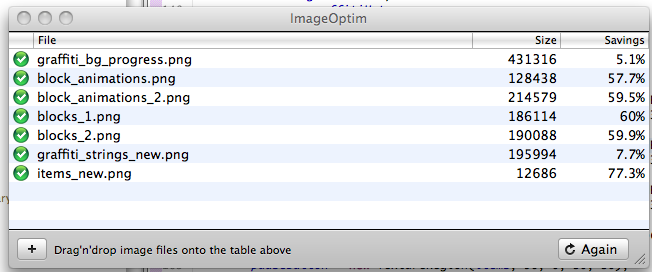
In order to reduce the size of our game's apk file, we used an image optimization software called, ImageOptim, available here http://imageoptim.pornel.net/.   Here is the description of the product:
ImageOptim optimizes images — so they take up less disk space and load faster — by finding best compression parameters and by removing unnecessary comments and color profiles. It handles PNG, JPEG and GIF animations.

It was very simple to use and delivered on its promise.  We were able to reduce the size of the apk file by 2MB by using jpeg images for the backgrounds and running all of the other png files through this software.  Screen shot is shown below.